 GoodsHaul
Keep product details and pack sizes together
Products sold by the box, pack or individual item need clear quantities. Keep your catalogue, item sizes and pack details together so the person taking an order and the person preparing it can work from the same information.
Use the demo to check how your own units, product range and customer prices fit the workflow. A clear catalogue is the starting point for useful stock and sales reporting.
Bring inventory into the order conversation
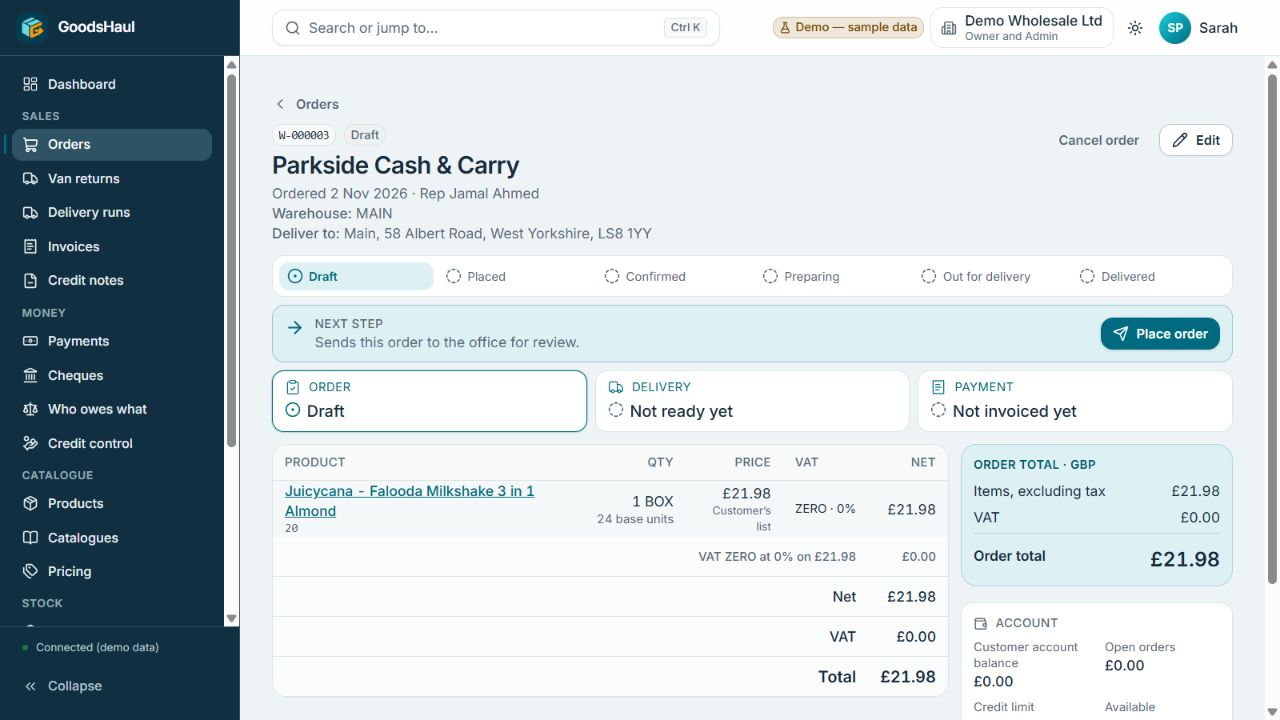
Review the customer, products, quantities and prices in the order screen. The journey strip and Next step panel explain where the work stands; the Order, Delivery and Payment cards keep operational and accounting states separate.
A delivered order can still need an invoice or have a payment outstanding. Keeping those distinctions visible helps the team ask the right question instead of treating delivery as financial completion.
Reduce repeated typing with reviewed product drafts
Photo-assisted product setup can suggest details for a draft. Your team reviews the product name, size, pack information and tax before saving. Suggestions support data entry; they do not replace the person checking what will enter the catalogue.
Check fit before moving your catalogue
Bring a small sample of your products, customers and prices. Agree the import scope and test the relevant order workflow before moving the agreed data. Setup work and support depend on your data and requirements.
- Check pack and item quantities
- Review customer-specific pricing requirements
- Test how stock information supports order entry
- Confirm imports, permissions and reporting needs
Practical questions
Is inventory management the same as stock management?
The terms overlap. On this website, inventory management focuses on product records and their connection to orders; stock management focuses on quantities, availability and expiry-related decisions.
Can I use GoodsHaul in a browser and on mobile?
GoodsHaul supports web, Android and iPhone. Ask for a demonstration of the tasks, permissions and supported offline workflows your team needs.